
Email scams have been around for years, but they have changed significantly.
Not long ago, most phishing emails were easy to spot. Poor grammar, strange formatting, and obvious red flags made them stand out.
That is no longer the case.
Today’s phishing scams are polished, professional, and often indistinguishable from real communications. They use familiar branding, realistic invoices, and convincing language to trick people into clicking links or sharing sensitive information.
Over the past few weeks, I’ve seen multiple examples of clients receiving domain renewal notices that looked completely legitimate. The issue is that these emails were not from their actual provider.
They were scams.
What Is a Phishing Scam?
A phishing scam is an attempt to steal personal, financial, or login information by pretending to be a trusted source.
This is usually done by:
- Sending an email that looks legitimate
- Encouraging you to click a link
- Directing you to a fake website
- Asking you to log in or enter sensitive information
Once you do, that information goes directly to the scammer.
Why Phishing Emails Are Getting Harder to Spot
Phishing scams have evolved.
Scammers now use:
- Real company logos and branding
- Professional formatting
- Legitimate-looking email addresses
- Personalized messaging
- AI-generated content with perfect grammar
They are no longer obvious.
In many cases, the only difference between a real email and a fake one is a small technical detail most people don’t think to check.
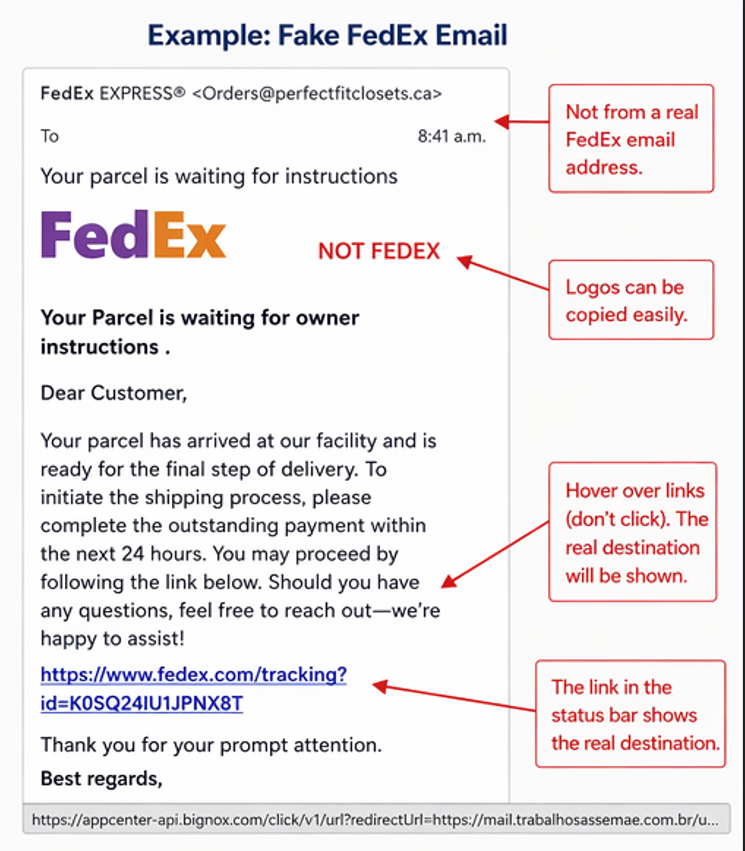
Real Example: Fake Delivery Email
Below is an example of a phishing email posing as a delivery notification.
What This Example Shows
This type of scam is extremely common and often involves companies like:
- shipping providers
- online retailers
- subscription services
At first glance, everything looks legitimate.
But when you look closer, you’ll notice:
- The sender email is not actually from the company
- The link does not go to the real website
- The message creates urgency to act quickly
These are classic phishing tactics.
The Domain Renewal Scam (Growing Trend)
One of the more targeted scams affecting business owners is the domain renewal scam.
You may receive an email that:
- Looks like an invoice
- Appears to come from a domain provider
- Urges you to renew immediately
- Includes a payment link
The problem is that the sender is not your actual domain registrar.
If you pay, you are sending money to a third party that does not control your domain.
This type of scam works because it looks routine and non-threatening.
Common Types of Phishing Emails
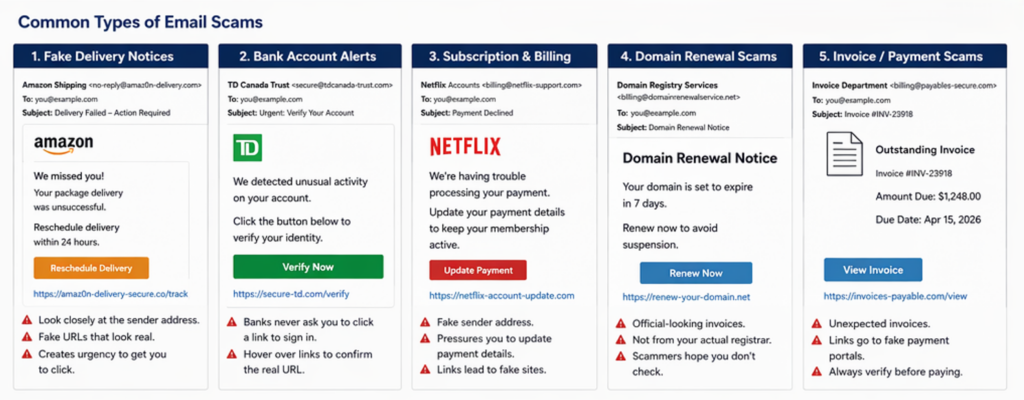
Delivery and Shipping Scams
Emails claiming:
- A package is delayed
- Payment is required
- Delivery needs confirmation
Banking and Account Alerts
Messages saying:
- Suspicious activity detected
- Account locked or suspended
- Immediate verification required
Subscription and Billing Notices
Fake invoices for:
- domain renewals
- software subscriptions
- online services
Job and Investment Offers
Emails offering:
- financial opportunities
- remote work
- high returns
How to Spot a Phishing Email
1. Check the Sender’s Email Address
Even if the name looks correct, the actual email address may not be.
For example:
- A real company uses @company.com
- A scam may use @company-support.net or a Gmail address
This is often the first and easiest red flag.
2. Hover Over Links Before Clicking
Before clicking any link:
- Hover your mouse over it
- Look at the actual destination URL
If it does not match the official website, do not click it.
3. Watch for Urgency
Scammers want you to act quickly.
Phrases like:
- “Immediate action required”
- “Account will be suspended”
- “Final notice”
These are designed to bypass your judgment.
4. Look for Unusual Requests
Be cautious if an email asks you to:
- Log in through a link
- Download an attachment
- Send money or payment
- Provide personal information
5. Verify Independently
If something feels off:
- Do not reply to the email
- Do not click any links
- Contact the company directly using their official website
What To Do If You Receive a Suspicious Email
If you suspect an email is fraudulent:
- Do not click any links
- Do not download attachments
- Mark it as phishing or spam
- Delete it
If it relates to an account you use, log in directly through the official website to check.
What To Do If You Clicked a Phishing Link
If you think you may have interacted with a phishing email:
- Change your passwords immediately
- Enable two-factor authentication
- Contact your financial institution if applicable
- Monitor accounts for unusual activity
- Report it to the Canadian Anti-Fraud Centre
Quick action can make a significant difference.
Why These Scams Work
Phishing scams work because they look normal.
They rely on:
- familiarity
- routine actions
- small moments of distraction
Most people are not expecting to be targeted, which is exactly why these scams succeed.
Final Thoughts
Email scams are not going away.
In fact, they are becoming more convincing every year.
The best defense is awareness and a simple habit: pause before you click.
A few extra seconds of verification can prevent serious financial loss.
If you ever want to review your financial setup and ensure your accounts, investments, and planning are structured securely, you can book a free consultation here.
FAQ
How can I tell if an email is a phishing scam?
Check the sender’s email address, avoid clicking links, and watch for urgency or unusual requests. When in doubt, verify directly.
Are domain renewal emails scams?
Some are legitimate, but many are scams. Always confirm with your actual domain provider before making any payment.
What happens if I click a phishing link?
You may be directed to a fake website designed to capture your login credentials or install malware. Change your passwords immediately if this happens.
Can phishing emails look completely real?
Yes. Many modern phishing emails use real branding, correct grammar, and convincing formatting, making them difficult to distinguish from legitimate messages.